
Ask most people what kills a ribbon microphone and you will hear two answers: volume and phantom power.
Volume is mostly wrong. Royer R-series microphones are built to sit in front of loud guitar amplifiers, and used properly a loud amp will not blow one. Phantom power is half right, but the switch on your preamp is rarely the problem.
What actually sends ribbons in for repair is a short and avoidable list.
1. The patch bay
This is the leading cause of blown ribbons in professional studios.
The microphone section of a patch bay is the only part that carries DC voltage, in the form of phantom power. Patch cables use tip-ring-sleeve plugs, and when one is pushed into a jack the contacts do not all connect at the same instant. For a split second the plug behaves like a miswired cable and puts phantom power where it should never go: across the ribbon itself, through the transformer.
Each of those brief jolts stresses the ribbon far more than normal recording does, and the effect adds up. A ribbon that should have lasted many years can be finished in one night of careless patching.
The fix: before you re-patch a microphone line, turn phantom power off on both the channel you are leaving and the channel you are going to. If you cannot be sure, unplug the microphone until the patching is done.
Patching hot is also hard on some condenser microphones, and if the monitors are up, on your speakers and your ears.
2. A bad cable
A cable that is shorted, damaged or wired incorrectly can do the same thing as the patch bay, only continuously. If pin 1 (ground) is shorted or miswired to pin 2 or pin 3, phantom power can reach the ribbon.
The fix: use good cables and check them. As a habit, turn phantom off when you are plugging or unplugging a passive ribbon. Once the microphone is connected through a healthy cable, switching phantom on or off is not a problem for a Royer.
A note on the active models
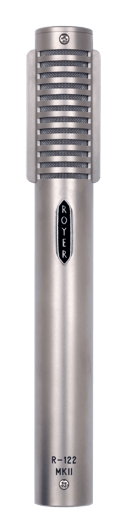
The R-122 MKII and SF-24 are phantom powered and need phantom to operate. The R-122V and SF-24V run on their own tube power supplies. None of this applies to them in the same way, but the cable and patch bay advice still does.

3. Moving air
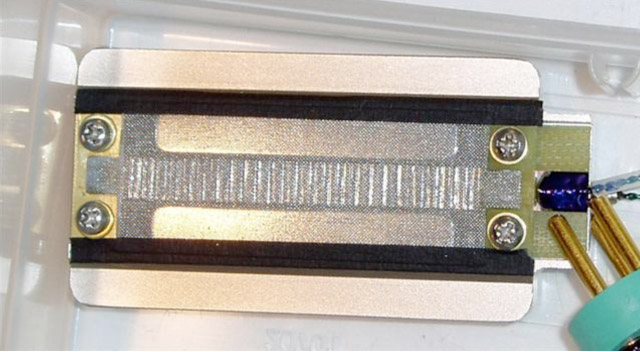
With ribbons, wind is the enemy. The ribbon is a very thin strip of corrugated aluminum, and it can catch air like a sail. A blast of air can stretch the corrugations or tear the ribbon.
That is a different thing from loudness. It is the puff of air from a kick drum port, a plosive from a singer, or simply walking briskly across the studio with the microphone uncovered.
The fixes:
- When you carry the microphone, put its sock on or cup your hand over the ribbon end.
- When it is on a stand and not in use, cover it. Air conditioning vents and doors opening and closing all move air.
- Always use a pop filter on vocals.
- On guitar cabinets, bass cabinets and kick drums, follow one rule: if you can feel a breeze, use a pop screen.
- On very loud sources, turn the microphone slightly off-axis. Ribbons sound the same slightly off-axis, and the ribbon does less work.
4. Metal dust
A ribbon microphone contains very strong magnets. They will pull in tiny metal particles from whatever surface you set the microphone down on. Once those particles reach the gap where the ribbon hangs, they can touch the ribbon and cause distortion.
The fix: watch where you put it down, and keep it in its sock and its box when it is not in use.
5. An airplane
Sealed, watertight cases often come out of an aircraft cargo hold holding a partial vacuum. Open the case and air rushes in, straight through the microphone.
The fix: before you check a ribbon microphone, loosen the pressure relief valve on the case, or give a watertight case a small vent. Do not worry about the cold. Temperature and humidity changes in the hold do not affect ribbon microphones.
6. Your friend
A high percentage of the microphones we re-ribbon were "loaned to a friend." Lend yours only to people who know how to treat one.
How to tell if your ribbon is stretched
John Jennings shows this in the video below. A stretched ribbon usually loses four to eight decibels of sensitivity. The low end gets loose and flabby and the highs go missing.
Look at it. Hold a flashlight behind the microphone (the one on your phone is fine) and run it down the length of the ribbon. A healthy ribbon is straight and centered, with an equal sliver of light on each side. If you see an S-shape, or the ribbon looks bowed and moves around when you tilt the microphone, it is probably stretched. This check alone catches most stretched ribbons.
Listen to it. Plug the microphone into your preamp, put on headphones, and gently rock the microphone back and forth. Gently: do not whip it around. If you hear scraping or flapping, the ribbon is loose and is touching the magnets.
One thing to know: a stretched ribbon can still sound fine on a quiet source with the microphone upright. The trouble shows when you put it on something loud.
Do not open the microphone. Opening any Royer product, or having it serviced by anyone not authorized by Royer, voids the warranty.
If it does need a new ribbon
It is not the end of the microphone. Replacing a condenser's capsule can change its character. A ribbon microphone that is properly re-ribboned at the factory comes back sounding as it did when it was new.
If you think yours is damaged, we are glad to look at it. Start on the Repair Service page. If you are the original owner, the first re-ribbon is free.
Most of the time, the test will tell you the microphone is fine. Treat it like the instrument it is and it will stay that way.
All posts